Development, Analysis And Research
by Andrew Johnstone
Setting up an FTP Server with ProFTPD on EC2
In: Linux
17 Jul 2010It’s very rare that I setup FTP servers on our production environments and always forget parts of the configuration, so figured I would list it here.
Active and Passive FTP
There are two types of modes active and passive FTP, using normal or passive FTP, a client initiates a session by sending a request to communicate through TCP port 21, port 21 being the (Control Channel connection or Command Port) .
Active FTP
Active FTP client connects from a random port (N) to the control channel port 21. The client listens to the random port number (N+1) and sends this to the command port 21. The server will then connect back to the client port to port 20.
- FTP server’s port 21 from anywhere (Client initiates connection)
- FTP server’s port 21 to ports > 1023 (Server responds to client’s control port)
- FTP server’s port 20 to ports > 1023 (Server initiates data connection to client’s data port)
- FTP server’s port 20 from ports > 1023 (Client sends ACKs to server’s data port)

Passive FTP
Passive FTP differs, by opening two random ports, the first issuing the command PASV to the command port. The server sends the PORT p command to the client and the client will initiate the transfer of the data on port N+1. This alleviates firewall connection from Active FTP, with the client initiating the request.
- FTP server’s port 21 from anywhere (Client initiates connection).
- FTP server’s port 21 to ports > 1023 (Server responds to client’s control port).
- FTP server’s ports > 1023 from anywhere (Client initiates data connection to random port specified by server).
- FTP server’s ports > 1023 to remote ports > 1023 (Server sends ACKs (and data) to client’s data port).

Setting up Proftpd on EC2
Open the firewall to accept the following ports
ec2-authorize default -p 20-21
ec2-authorize default -p 1024-1048
apt-get install proftpd
Add/Replace the following lines in /etc/proftpd/proftpd.conf
PassivePorts                  1024 1048
RequireValidShell		on
ServerType			standalone
DefaultRoot ~
UseFtpUsers  on
AuthGroupFile	/etc/group

AuthPAM on
AuthPAMConfig proftpd

MasqueradeAddress		set to public ip address
As EC2 NATs the public ip address for each machine, the option for MasqueradeAddress is required and must be set to the public ip address. In addition the servertype failed to work with init.d, however never looked into why.
Full configuration.
#
# /etc/proftpd/proftpd.conf -- This is a basic ProFTPD configuration file.
# To really apply changes reload proftpd after modifications.
#

# Includes DSO modules
Include /etc/proftpd/modules.conf

# Set off to disable IPv6 support which is annoying on IPv4 only boxes.
UseIPv6				off
# If set on you can experience a longer connection delay in many cases.
IdentLookups			off

ServerName			"Debian"
ServerType			standalone
DeferWelcome			off

MultilineRFC2228		on
DefaultServer			on
ShowSymlinks			on

TimeoutNoTransfer		600
TimeoutStalled			600
TimeoutIdle			1200

DisplayLogin                    welcome.msg
DisplayChdir               	.message true
ListOptions                	"-l"

DenyFilter			*.*/

# Use this to jail all users in their homes
DefaultRoot ~

# Users require a valid shell listed in /etc/shells to login.
# Use this directive to release that constrain.
RequireValidShell		on

# Port 21 is the standard FTP port.
Port				21

# In some cases you have to specify passive ports range to by-pass
# firewall limitations. Ephemeral ports can be used for that, but
# feel free to use a more narrow range.
PassivePorts                  1024 1048

# If your host was NATted, this option is useful in order to
# allow passive tranfers to work. You have to use your public
# address and opening the passive ports used on your firewall as well.
MasqueradeAddress		174.129.218.53

# This is useful for masquerading address with dynamic IPs:
# refresh any configured MasqueradeAddress directives every 8 hours

# DynMasqRefresh 28800

# To prevent DoS attacks, set the maximum number of child processes
# to 30.  If you need to allow more than 30 concurrent connections
# at once, simply increase this value.  Note that this ONLY works
# in standalone mode, in inetd mode you should use an inetd server
# that allows you to limit maximum number of processes per service
# (such as xinetd)
MaxInstances			30

# Set the user and group that the server normally runs at.
User				proftpd
Group				nogroup

# Umask 022 is a good standard umask to prevent new files and dirs
# (second parm) from being group and world writable.
Umask				022  022
# Normally, we want files to be overwriteable.
AllowOverwrite			on

# Uncomment this if you are using NIS or LDAP via NSS to retrieve passwords:
# PersistentPasswd		off

# This is required to use both PAM-based authentication and local passwords
# AuthOrder			mod_auth_pam.c* mod_auth_unix.c

# Be warned: use of this directive impacts CPU average load!
# Uncomment this if you like to see progress and transfer rate with ftpwho
# in downloads. That is not needed for uploads rates.
#
# UseSendFile			off

TransferLog /var/log/proftpd/xferlog
SystemLog   /var/log/proftpd/proftpd.log

QuotaEngine off

Ratios off

# Delay engine reduces impact of the so-called Timing Attack described in
# http://security.lss.hr/index.php?page=details&ID=LSS-2004-10-02
# It is on by default.

DelayEngine on

ControlsEngine        off
ControlsMaxClients    2
ControlsLog           /var/log/proftpd/controls.log
ControlsInterval      5
ControlsSocket        /var/run/proftpd/proftpd.sock

AdminControlsEngine off

#
# Alternative authentication frameworks
#
#Include /etc/proftpd/ldap.conf
#Include /etc/proftpd/sql.conf

#
# This is used for FTPS connections
#
#Include /etc/proftpd/tls.conf

UseFtpUsers  on
AuthGroupFile	/etc/group

AuthPAM on
AuthPAMConfig proftpd

  AllowUser ftpuser
  DenyALL
- No Comments
- Tags: EC2, FTP
Recently I started migrating an old server, which had skip-networking within my.cnf, which is not a dynamic option and requires you to restart the mysql server.
I typically rsync the source code and static data to a new machine. Configure the webserver with the relevant vhosts and change the database connection details to point to the old server. After the site has been tested on the new server and dns has fully resolved move the database server across.
However, with skip-networking enabled you would have to restart MySQL and is not feasible during working hours. After a little searching I came across socat, which allows you to bind a socket to tcp.
socat -v tcp-l:6666,reuseaddr,fork unix:/var/run/mysqld/mysqld.sock
socat is very flexible and the man pages for socat are pretty extensive .
- (1) Comment
- Tags: Linux, MySQL
Emailing Attachments: Exim Filters and PHP streams
In: PHP
31 May 2010A while back a colleague and myself had a two week sprint to ensure that we could deliver 20k emails with up to 5mb attachments each. We experimented with 4k emails at 5mb each sending straight through the MTA, which we found to cause excessive load on the servers.
Using exim filters we could add attachments at the delivery stage, therefore reducing overhead in constructing and injecting data into an email. The delivery of emails varied as to whether it was feasible to send as a BCC or whether there were placeholders intended for each individual recipient. As such the following addresses the worst case scenario of attachments with placeholders intended for each individual recipient.
A few things that we needed to be careful of were:
- Proper encoding and disposition of the content
- _unique_ identifier used as placeholder
- Ensure the MIME boundaries will still be unique after adding the payload.
One important fact is that if the exim filter failed for any reason, the message is retained in the queue, allowing you to control sending out broken messages, I.e. missing files.
Exims configuration is located within the following folders, the important part for this is the transport that specifies the exim_filter to be used. There are varying configurations of this, which you can use for smarthosts, local delivery or remote smtp.
/etc/exim4/conf.d/
|-- acl
|-- auth
|-- main
|-- retry
|-- rewrite
|-- router
`-- transport
Remote SMTP
### transport/30_exim4-config_remote_smtp
#################################
# This transport is used for delivering messages over SMTP connections.

remote_smtp:
  debug_print = "T: remote_smtp for $local_part@$domain"
  driver = smtp
  transport_filter = /path/to/exim/filter/attachments.php
.ifdef REMOTE_SMTP_HOSTS_AVOID_TLS
  hosts_avoid_tls = REMOTE_SMTP_HOSTS_AVOID_TLS
.endif
.ifdef REMOTE_SMTP_HEADERS_REWRITE
  headers_rewrite = REMOTE_SMTP_HEADERS_REWRITE
.endif
.ifdef REMOTE_SMTP_RETURN_PATH
  return_path = REMOTE_SMTP_RETURN_PATH
.endif
.ifdef REMOTE_SMTP_HELO_FROM_DNS
  helo_data=REMOTE_SMTP_HELO_DATA
.endif
Local Mail Delivery
### transport/30_exim4-config_maildir_home
#################################

# Use this instead of mail_spool if you want to to deliver to Maildir in
# home-directory - change the definition of LOCAL_DELIVERY
#
maildir_home:
  debug_print = "T: maildir_home for $local_part@$domain"
  driver = appendfile
  transport_filter = /path/to/exim/filter/attachments.php

  .ifdef MAILDIR_HOME_MAILDIR_LOCATION
  directory = MAILDIR_HOME_MAILDIR_LOCATION
  .else
  directory = $home/Maildir
  .endif
  .ifdef MAILDIR_HOME_CREATE_DIRECTORY
  create_directory
  .endif
  .ifdef MAILDIR_HOME_CREATE_FILE
  create_file = MAILDIR_HOME_CREATE_FILE
  .endif
  delivery_date_add
  envelope_to_add
  return_path_add
  maildir_format
  .ifdef MAILDIR_HOME_DIRECTORY_MODE
  directory_mode = MAILDIR_HOME_DIRECTORY_MODE
  .else
  directory_mode = 0700
  .endif
  .ifdef MAILDIR_HOME_MODE
  mode = MAILDIR_HOME_MODE
  .else
  mode = 0600
  .endif
  mode_fail_narrower = false
  # This transport always chdirs to $home before trying to deliver. If
  # $home is not accessible, this chdir fails and prevents delivery.
  # If you are in a setup where home directories might not be
  # accessible, uncomment the current_directory line below.
  # current_directory = /
Remote Smarthost
### transport/30_exim4-config_remote_smtp_smarthost
#################################

# This transport is used for delivering messages over SMTP connections
# to a smarthost. The local host tries to authenticate.
# This transport is used for smarthost and satellite configurations.

remote_smtp_smarthost:
  debug_print = "T: remote_smtp_smarthost for $local_part@$domain"
  driver = smtp
  transport_filter = /path/to/exim/filter/attachments.php
  hosts_try_auth = < ; ${if exists{CONFDIR/passwd.client}
        {
        ${lookup{$host}nwildlsearch{CONFDIR/passwd.client}{$host_address}}
        }
        {}
      }
.ifdef REMOTE_SMTP_SMARTHOST_HOSTS_AVOID_TLS
  hosts_avoid_tls = REMOTE_SMTP_SMARTHOST_HOSTS_AVOID_TLS
.endif
.ifdef REMOTE_SMTP_HEADERS_REWRITE
  headers_rewrite = REMOTE_SMTP_HEADERS_REWRITE
.endif
.ifdef REMOTE_SMTP_RETURN_PATH
  return_path = REMOTE_SMTP_RETURN_PATH
.endif
.ifdef REMOTE_SMTP_HELO_FROM_DNS
  helo_data=REMOTE_SMTP_HELO_DATA
.endif
An example of an exim filter
abstract class eximFilter extends php_user_filter {

  private $_stream;
  private $_filterAppended  = FALSE;
  private $_replacements = array();

  private function flush() {
    rewind($this->_stream);
    fpassthru($this->_stream);
    fclose($this->_stream);
  }

  /**
   * Ensure output steam available
   */
  private function hasStream() {
    return is_resource($this->_stream);
  }

  private function addFilter() {

  }

  /**
   * Remove last attached stream
   */
  private function removeFilter() {
    if ($this->hasStream())
    $this->_filterAppended =  !stream_filter_remove($this->_stdOut);
  }

  public function __destruct() {
    if (is_resource($this->_stream))  fclose($this->_stream);
  }

  /**
   * @param string $reason
   */
  protected function bail($reason = false) {
    if(is_string($reason)) {
      echo $reason;
    }
    exit(1);

  }

}

class stdOutFilter extends eximFilter {
  public function filter($line) {
    echo $line;
  }
}

class eximFilters {

  private $_data;
  private $_wrapper = 'exim';
  public  $_filters = array();
  private $_filterWrapper, $_filterName;

  private $_instream;
  private $_outstream;

  public function setStreams($in, $out) {
    $this->_instream = $in;
    $this->_outstream = $out;
    return $this;
  }

  public function addFilter(eximFilter $filter) {
    $this->_filters[ $f = get_class($filter) ] = $filter;
    return $this;
  }

  public function removeFilter(eximFilter $filter) {
    unset( $this->_filters[ get_class($filter) ]);
    return $this;
  }

  public function getFilters() {
    return $this->_filters;
  }

  /**
   * Ensure streams available
   */
  private function hasStream() {
    return (is_resource($this->_instream) && is_resource($this->_outstream));
  }

  public function execute() {
    while($line = fgets($this->_instream)) {
      foreach($this->getFilters() as $filter) {
        $filter->filter($line);
      }
    }
  }
}

$filters = new eximFilters();
$filters->setStreams( fopen('php://stdin',  'r+'), fopen('php://stdout',  'w') )
->addFilter(new stdOutFilter())
->execute();
With attachments you have to base64 encode the stream and split the data at the 76 character onto a new line. You also have to have a scheme for acquiring the header and location for the file that is to be injected into the stream and remove the line.
This reduced IO, Memory and CPU usage when dispatching bulk emails with attachments with roughly a 2000% performance increase.
- No Comments
- Tags: Exim, Mail, PHP
Broken XFS on Elastic Block Storage (EBS) and SSH failing on “Write failed: Broken pipe”
In: Linux
29 May 2010After attaching an EBS volume and rsyncing files to the EBS device the server had a load average of 6 before the server became unresponsive to ssh connections and complained of a broken pipe for ssh.
The server was still responding to http requests and ping, however trying to establish a ssh connection, it connected and then failed on a broken pipe.
The files that were rsync’d to the EBS device had completed, however creating a snapshot of the EBS device and mounting to a new EC2 instance caused the new server to become unresponsive to ssh connections.
I had not restarted the original instance, however I wanted to ensure that the data was safe that had been backed up and identify what the problem was. I forced the EBS device to detach, however ssh still failed on a broken pipe.
    andrew@andrew-home:~$ ping ajohnstone.com
    PING ajohnstone.com (174.129.218.53) 56(84) bytes of data.
    64 bytes from ec2-174-129-218-53.compute-1.amazonaws.com (174.129.218.53): icmp_req=1 ttl=44 time=101 ms
    64 bytes from ec2-174-129-218-53.compute-1.amazonaws.com (174.129.218.53): icmp_req=2 ttl=44 time=120 ms
    64 bytes from ec2-174-129-218-53.compute-1.amazonaws.com (174.129.218.53): icmp_req=3 ttl=44 time=99.5 ms
    ^C
    --- ajohnstone.com ping statistics ---
    3 packets transmitted, 3 received, 0% packet loss, time 2003ms
    rtt min/avg/max/mdev = 99.591/107.424/120.877/9.562 ms

    andrew@andrew-home:~$ ssh root@ajohnstone.com -v
    OpenSSH_5.5p1 Debian-4, OpenSSL 0.9.8n 24 Mar 2010
    debug1: Reading configuration data /etc/ssh/ssh_config
    debug1: Applying options for *
    debug1: Connecting to ajohnstone.com [174.129.218.53] port 22.
    debug1: Connection established.
    debug1: identity file /home/andrew/.ssh/id_rsa type -1
    debug1: identity file /home/andrew/.ssh/id_rsa-cert type -1
    debug1: identity file /home/andrew/.ssh/id_dsa type 2
    debug1: Checking blacklist file /usr/share/ssh/blacklist.DSA-1024
    debug1: Checking blacklist file /etc/ssh/blacklist.DSA-1024
    debug1: identity file /home/andrew/.ssh/id_dsa-cert type -1
    debug1: Remote protocol version 2.0, remote software version OpenSSH_5.1p1 Debian-5
    debug1: match: OpenSSH_5.1p1 Debian-5 pat OpenSSH*
    debug1: Enabling compatibility mode for protocol 2.0
    debug1: Local version string SSH-2.0-OpenSSH_5.5p1 Debian-4
    debug1: SSH2_MSG_KEXINIT sent
    debug1: SSH2_MSG_KEXINIT received
    debug1: kex: server->client aes128-ctr hmac-md5 none
    debug1: kex: client->server aes128-ctr hmac-md5 none
    debug1: SSH2_MSG_KEX_DH_GEX_REQUEST(1024<1024<8192) sent
    debug1: expecting SSH2_MSG_KEX_DH_GEX_GROUP
    debug1: SSH2_MSG_KEX_DH_GEX_INIT sent
    debug1: expecting SSH2_MSG_KEX_DH_GEX_REPLY
    debug1: Host 'ajohnstone.com' is known and matches the RSA host key.
    debug1: Found key in /home/andrew/.ssh/known_hosts:145
    debug1: ssh_rsa_verify: signature correct
    debug1: SSH2_MSG_NEWKEYS sent
    debug1: expecting SSH2_MSG_NEWKEYS
    debug1: SSH2_MSG_NEWKEYS received
    debug1: Roaming not allowed by server
    debug1: SSH2_MSG_SERVICE_REQUEST sent
    debug1: SSH2_MSG_SERVICE_ACCEPT received
    debug1: Authentications that can continue: publickey
    debug1: Next authentication method: publickey
    debug1: Offering public key: /home/andrew/.ssh/id_dsa
    debug1: Server accepts key: pkalg ssh-dss blen 433
    debug1: Authentication succeeded (publickey).
    debug1: channel 0: new [client-session]
    debug1: Requesting no-more-sessions@openssh.com
    debug1: Entering interactive session.
    Write failed: Broken pipe
The New instance :
    andrew@andrew-home:~$ ping ec2-174-129-95-8.compute-1.amazonaws.com
    PING ec2-174-129-95-8.compute-1.amazonaws.com (174.129.95.8) 56(84) bytes of data.
    64 bytes from ec2-174-129-95-8.compute-1.amazonaws.com (174.129.95.8): icmp_req=1 ttl=43 time=100 ms
    64 bytes from ec2-174-129-95-8.compute-1.amazonaws.com (174.129.95.8): icmp_req=2 ttl=43 time=100 ms
    ^C
    --- ec2-174-129-95-8.compute-1.amazonaws.com ping statistics ---
    2 packets transmitted, 2 received, 0% packet loss, time 1001ms
    rtt min/avg/max/mdev = 100.039/100.269/100.499/0.230 ms

    andrew@andrew-home:~$ ssh root@ec2-174-129-95-8.compute-1.amazonaws.com -i ~/.ssh/id_ajohnstone.com.key
    The authenticity of host 'ec2-174-129-95-8.compute-1.amazonaws.com (174.129.95.8)' can't be established.
    RSA key fingerprint is a6:c9:19:45:bc:62:e0:e5:5f:c6:2b:d6:36:94:24:21.
    Are you sure you want to continue connecting (yes/no)? yes
    Warning: Permanently added 'ec2-174-129-95-8.compute-1.amazonaws.com,174.129.95.8' (RSA) to the list of known hosts.
    Linux ip-10-251-202-8 2.6.21.7-2.fc8xen-ec2-v1.0 #2 SMP Tue Sep 1 10:04:29 EDT 2009 i686

    The programs included with the Debian GNU/Linux system are free software;
    the exact distribution terms for each program are described in the
    individual files in /usr/share/doc/*/copyright.

    Debian GNU/Linux comes with ABSOLUTELY NO WARRANTY, to the extent
    permitted by applicable law.

    Amazon EC2 Debian 5.0.4 lenny AMI built by Eric Hammond
    http://alestic.com  http://ec2debian-group.notlong.com
    ip-10-251-202-8:~# mkdir /mnt/tmp
    ip-10-251-202-8:~# mount /dev/sda10  /mnt/tmp/
    ip-10-251-202-8:~# cd /mnt/tmp/
    ip-10-251-202-8:/mnt/tmp# ll
Listing directories failed at that point and trying to establish an ssh connection failed at the following:
    andrew@andrew-home:~$ ssh -v root@ec2-174-129-95-8.compute-1.amazonaws.com -i ~/.ssh/id_ajohnstone.com.key
    OpenSSH_5.5p1 Debian-4, OpenSSL 0.9.8n 24 Mar 2010
    debug1: Reading configuration data /etc/ssh/ssh_config
    debug1: Applying options for *
    debug1: Connecting to ec2-174-129-95-8.compute-1.amazonaws.com [174.129.95.8] port 22.
    debug1: Connection established.
    debug1: identity file /home/andrew/.ssh/id_ajohnstone.com.key type -1
    debug1: identity file /home/andrew/.ssh/id_ajohnstone.com.key-cert type -1
I forced detach the snapshot EBS device on the new server, although the server was still unresponsive to ssh connections, however after rebooting the server I was able to ssh into the box. Syslog showed a series of faults with XFS after rebooting
The difference between the first server and the second was that the new server failed to even connect and the first stated that there was a broken pipe when connecting via ssh. I tried rebooting the original instance and and as soon was able to ssh back into the machine.
Typically I always use ext3 or reiserfs, however the AMI (ami-ed16f984) I was using did not have reiserfs compiled into the kernel.
- No Comments
- Tags: EBS, Linux, Storage
MySQL: LAST_INSERT_ID()
In: MySQL
26 May 2010If you use LAST_INSERT_ID() and insert on the primary key value it will only return the last “insert id” which has not included the primary key
DROP TABLE IF EXISTS `example`;
CREATE TABLE IF NOT EXISTS `example` ( id INT(11) NOT NULL AUTO_INCREMENT, b CHAR(3), PRIMARY KEY(id)) ENGINE=InnoDB;
INSERT INTO example SET id=1;
INSERT INTO example SET id=2;
INSERT INTO example SET id=3;
SELECT LAST_INSERT_ID(); # outputs 0
INSERT INTO example SET b=1;
INSERT INTO example SET b=2;
INSERT INTO example SET b=3;
SELECT LAST_INSERT_ID(); # outputs 6
LAST_INSERT_ID will also persist its value, and also in addition you can set the value with an expression.
TRUNCATE example;
SELECT LAST_INSERT_ID(); # outputs 6
SELECT LAST_INSERT_ID(0); # use an expression, outputs 0

BEGIN;
INSERT INTO example SET b=1;
INSERT INTO example SET b=2;
INSERT INTO example SET b=3;
SELECT LAST_INSERT_ID(); # outputs 3
ROLLBACK;
SELECT LAST_INSERT_ID(); # outputs 3
- No Comments
- Tags: MySQL
Monitoring Processes with PS
In: Linux
22 May 2010I wrote a few munin plugins to monitor memory, CPU and IO usage per process. After collecting the stats for a few days I noticed that MySQL CPU usage had a constant value of 9.1, however all other processes collected CPU usage correctly..
CPU usage
proc=mysqld
value=$(ps u -C $proc | awk 'BEGIN { sum = 0 } NR > 1 { sum += $3 }; END { print sum }')
Memory usage – VSZ – Virtual Memory
proc=mysqld
value=$(ps u -C $proc | awk 'BEGIN { sum = 0 } NR > 1 { sum += $6 }; END { print sum * 1024 }')
The strange part was that top displayed varying CPU usage for the process and did not match what “ps aux” states.
db1vivo:/etc/munin/plugins# top -n1 | grep mysql | awk '{print $10}'
97
db1vivo:/etc/munin/plugins# top -n1 | grep mysql | awk '{print $10}'
83
db1vivo:/etc/munin/plugins# top -n1 | grep mysql | awk '{print $10}'
33

db1vivo:/etc/munin/plugins# top -b -n1  | grep mysql
 2909 mysql     20   0 8601m 7.9g 6860 S   28 50.2  32843:58 mysqld
 2870 root      20   0 17316 1456 1160 S    0  0.0   0:00.02 mysqld_safe
30442 prodadmi  20   0 31120  376  228 R    0  0.0   0:00.00 mysql

db1vivo:/etc/munin/plugins# ps fuax | grep mysql
root      2870  0.0  0.0  17316  1456 ?        S     2009   0:00 /bin/sh /usr/bin/mysqld_safe
mysql     2909  9.1 50.2 8807588 8275404 ?     Sl    2009 32842:49  _ /usr/sbin/mysqld --basedir=/usr --datadir=/mnt/data/mysql --user=mysql --pid-file=/var/run/mysqld/mysqld.pid --skip-external-locking --port=3306 --socket=/var/run/mysqld/mysqld.sock
root      2910  0.0  0.0   3780   596 ?        S     2009   0:00  _ logger -p daemon.err -t mysqld_safe -i -t mysqld
I have never actually read the man pages for “ps” and my assumption had always been that “ps aux” gave you current CPU utilization. However, reading the man pages for both “ps” and “top” it’s pretty clear what the CPU values are based on and the reason other processes varied were due to child processes.
PS
cpu utilization of the process in “##.#” format. Currently, it is the CPU time used divided by the time the process has been running (cputime/realtime ratio), expressed as a percentage. It will not add up to 100% unless you are lucky.
TOP
The task’s share of the elapsed CPU time since the last screen update, expressed as a percentage of total CPU time. In a true SMP environment, if ‘Irix mode’ is Off, top will operate in ‘Solaris mode’ where a task’s cpu usage will be divided by the total number of CPUs.
The munin plugin resulted in the following proc_cpu
#!/bin/sh
#
# (c) 2010, Andrew Johnstone andrew @ajohnstone.com
# Based on the 'proc_mem' plugin, written by Rodrigo Sieiro rsieiro @gmail.com
#
# Configure it by using the processes env var, i.e.:
#
# [proc_mem]
# env.processes        php mysqld apache2
#

. $MUNIN_LIBDIR/plugins/plugin.sh

if [ "$1" = "autoconf" ]; then
        echo yes
        exit 0
fi

processes=${processes:="php mysqld apache2"}

if [ "$1" = "config" ]; then

        NCPU=$(egrep '^cpu[0-9]+ ' /proc/stat | wc -l)
        PERCENT=$(($NCPU * 100))
        if [ "$scaleto100" = "yes" ]; then
                graphlimit=100
        else
                graphlimit=$PERCENT
        fi
        SYSWARNING=`expr $PERCENT '*' 30 / 100`
        SYSCRITICAL=`expr $PERCENT '*' 50 / 100`
        USRWARNING=`expr $PERCENT '*' 80 / 100`

        echo 'graph_title CPU usage by process'
        echo "graph_args --base 1000 -r --lower-limit 0 --upper-limit $graphlimit"
        echo 'graph_vlabel %'
        echo 'graph_category processes'
        echo 'graph_info This graph shows the cpu usage of several processes'

        for proc in $processes; do
                  echo "$proc.label $proc"
        done
        exit 0
fi

TMPFILE=`mktemp -t top.XXXXXXXXXX` && {

  top -b -n1 > $TMPFILE

  for proc in $processes; do
    value=$(cat $TMPFILE | grep $proc | awk 'BEGIN { SUM = 0 } { SUM += $9} END { print SUM }')
    echo "$proc.value $value"
  done
  rm -f $TMPFILE
}
- No Comments
- Tags: Bash, Linux, Monitoring
We have re-written parts of the default configuration for ucarp & haproxy to run several VIPs on the same interface. This works on debian, however some minor modifications maybe needed for other distributions.
Ucarp implementation
/etc/network/if-up.d/ucarp
#!/bin/sh

UCARP=/usr/sbin/ucarp
EXTRA_PARAMS=""

if [ ! -x $UCARP ]; then
	exit 0
fi

if [ -z "$IF_UCARP_UPSCRIPT" ]; then
	IF_UCARP_UPSCRIPT=/usr/share/ucarp/vip-up
fi

if [ -z "$IF_UCARP_DOWNSCRIPT" ]; then
	IF_UCARP_DOWNSCRIPT=/usr/share/ucarp/vip-down
fi

if [ -n "$IF_UCARP_MASTER" ]; then
	if ! expr "$IF_UCARP_MASTER" : "no|off|false|0" > /dev/null; then
		EXTRA_PARAMS="-P"
	fi
fi

if [ -n "$IF_UCARP_ADVSKEW" ]; then
	EXTRA_PARAMS="$EXTRA_PARAMS -k $IF_UCARP_ADVSKEW"
fi

if [ -n "$IF_UCARP_ADVBASE" ]; then
	EXTRA_PARAMS="$EXTRA_PARAMS -b $IF_UCARP_ADVBASE"
fi

# Allow logging to custom facility
if [ -n "$IF_UCARP_FACILITY" ] ; then
        EXTRA_PARAMS="$EXTRA_PARAMS -f $IF_UCARP_FACILITY"
fi

# Modified to use start / stop /daemon
if [ -n "$IF_UCARP_VID" -a -n "$IF_UCARP_VIP" -a
		-n "$IF_UCARP_PASSWORD" ]; then
	start-stop-daemon -b -m -S -p "/var/run/ucarp.$IF_UCARP_VIP.pid" -x $UCARP -- -i $IFACE -s $IF_ADDRESS -z
		-v $IF_UCARP_VID -p $IF_UCARP_PASSWORD -a $IF_UCARP_VIP
		-u $IF_UCARP_UPSCRIPT -d $IF_UCARP_DOWNSCRIPT
 		$EXTRA_PARAMS
fi
/etc/network/if-down.d/ucarp
#!/bin/sh

UCARP=/usr/sbin/ucarp
EXTRA_PARAMS=""

if [ ! -x $UCARP ]; then
	exit 0
fi

if [ -z "$IF_UCARP_UPSCRIPT" ]; then
	IF_UCARP_UPSCRIPT=/usr/share/ucarp/vip-up
fi

if [ -z "$IF_UCARP_DOWNSCRIPT" ]; then
	IF_UCARP_DOWNSCRIPT=/usr/share/ucarp/vip-down
fi

if [ -n "$IF_UCARP_MASTER" ]; then
	if ! expr "$IF_UCARP_MASTER" : "no|off|false|0" > /dev/null; then
		EXTRA_PARAMS="-P"
	fi
fi

if [ -n "$IF_UCARP_ADVSKEW" ]; then
	EXTRA_PARAMS="$EXTRA_PARAMS -k $IF_UCARP_ADVSKEW"
fi

if [ -n "$IF_UCARP_ADVBASE" ]; then
	EXTRA_PARAMS="$EXTRA_PARAMS -b $IF_UCARP_ADVBASE"
fi

# Allow logging to custom facility
if [ -n "$IF_UCARP_FACILITY" ] ; then
        EXTRA_PARAMS="$EXTRA_PARAMS -f $IF_UCARP_FACILITY"
fi

# Modified to use start / stop /daemon
if [ -n "$IF_UCARP_VID" -a -n "$IF_UCARP_VIP" -a
		-n "$IF_UCARP_PASSWORD" ]; then
	start-stop-daemon -K -p "/var/run/ucarp.$IF_UCARP_VIP.pid" -x $UCARP -- -i $IFACE -s $IF_ADDRESS -z
		-v $IF_UCARP_VID -p $IF_UCARP_PASSWORD -a $IF_UCARP_VIP
		-u $IF_UCARP_UPSCRIPT -d $IF_UCARP_DOWNSCRIPT
 		$EXTRA_PARAMS
fi
Interfaces
/etc/network/interfaces
# This file describes the network interfaces available on your system
# and how to activate them. For more information, see interfaces(5).

# The loopback network interface
auto lo
iface lo inet loopback

# The primary network interface
auto eth0
iface eth0 inet static
        address   100.100.100.14
        netmask   255.255.255.192
        broadcast 100.100.100.63
        gateway   100.100.100.1
	up /bin/ip address add 100.100.100.32/32 dev eth0 scope host
	up /sbin/arptables -I OUTPUT -s 100.100.100.32 -j DROP
	down /bin/ip address del 100.100.100.32/32 dev eth0 scope host
	down /sbin/arptables -F
        up /sbin/ifup eth0:1
        down /sbin/ifdown eth0:1
        up /sbin/ifup eth0:2
        down /sbin/ifdown eth0:2
        up /sbin/ifup eth0:3
        down /sbin/ifdown eth0:3
auto eth0:1
iface eth0:1 inet static
        address   100.100.100.26
        netmask   255.255.255.192
        broadcast 100.100.100.63
        ucarp-vid 6
        ucarp-vip 100.100.100.34
        ucarp-password password
        ucarp-advskew 14
        ucarp-advbase 1
        ucarp-facility local1
        ucarp-master no
        ucarp-upscript /etc/network/local/vip-up-mywebsite1.com
        ucarp-downscript /etc/network/local/vip-down-mywebsite1.com
iface eth0:1:ucarp inet static
        address 100.100.100.34
        netmask 255.255.255.192
auto eth0:2
iface eth0:2 inet static
        address   100.100.100.40
        netmask   255.255.255.192
        broadcast 100.100.100.63
        ucarp-vid 9
        ucarp-vip 100.100.100.36
        ucarp-password password
        ucarp-advskew 14
        ucarp-advbase 1
        ucarp-facility local1
        ucarp-master no
        ucarp-upscript /etc/network/local/vip-up-mywebsite2.com
        ucarp-downscript /etc/network/local/vip-down-mywebsite2.com
iface eth0:2:ucarp inet static
        address 100.100.100.36
        netmask 255.255.255.192
auto eth0:3
iface eth0:3 inet static
        address   100.100.100.44
        netmask   255.255.255.192
        broadcast 100.100.100.63
        ucarp-vid 12
        ucarp-vip 100.100.100.31
        ucarp-password password
        ucarp-advskew 100
        ucarp-advbase 1
        ucarp-facility local1
        ucarp-master no
        ucarp-upscript /etc/network/local/vip-up-mywebsite3.com
        ucarp-downscript /etc/network/local/vip-down-mywebsite3.com
iface eth0:3:ucarp inet static
        address 100.100.100.31
        netmask 255.255.255.192
HA Proxy Configuration
This needs to be stored for each VIP in the listed interfaces above
/etc/network/local/vip-up-mywebsite1.com
#!/bin/sh

/sbin/ifup $1:ucarp
start-stop-daemon -S -p  /var/run/haproxy.mywebsite1.com.pid -x /usr/sbin/haproxy  -- -f /etc/haproxy/haproxy.mywebsite1.com.cfg  -D  -p /var/run/haproxy.mywebsite1.com.pid
/etc/network/local/vip-down-mywebsite1.com
#!/bin/bash

start-stop-daemon -K -p  /var/run/haproxy.mywebsite1.com.pid -x /usr/sbin/haproxy  -- -f /etc/haproxy/haproxy.mywebsite1.com.cfg  -D  -p /var/run/haproxy.mywebsite1.com.pid
/sbin/ifdown $1:ucarp
/etc/haproxy/haproxy.mywebsite1.com.cfg
# this config needs haproxy-1.1.28 or haproxy-1.2.1

global
        log /dev/log    local1
        #log loghost    local0 info
        maxconn 4096
        #chroot /usr/share/haproxy
        user haproxy
        group haproxy
        daemon
        #debug
        #quiet

defaults
        log     global
        mode    http
        option  httplog
        option  dontlognull
        retries 3
        option redispatch
        # option  httpclose
        maxconn 2000
        contimeout      50000
        clitimeout      50000
        srvtimeout      120000
        # option      httpclose
        option  forwardfor

listen myweb1 100.100.100.31:80
        mode http
        balance roundrobin
        stats enable
        stats realm HaProxy Statistics
        stats auth stats:password
        stats scope .
        stats uri /haproxy?stats
        server web1 100.100.100.44:80 check inter 2000 fall 3
        server web2 100.100.100.45:80 check inter 2000 fall 3
        server web3 100.100.100.46:80 check inter 2000 fall 3
Disable the startup of haproxy and ifup the interfaces.
sed -i 's/ENABLED=1/ENABLED=0/g'
/etc/init.d/haproxy stop
- No Comments
- Tags: HA, HAProxy, Ucarp
EC2: New instances and firewalls
In: Linux
30 Jan 2010We hold much of our server configuration within the office, which is restricted down by iptables. As such when spawning new instances on EC2 we need to allow access to our internal network via iptables, to allow nodes to connect to the office and configure themselves.
The following script can be run within a crontab to automatically add the nodes to your firewall.
Alternatively you could add a wrapper, whilst creating these, although this is not as nice as using elasticfox etc.
#!/bin/bash

IGNORE_REGION='us-west-1'; # For some reason this failed to connect/timeout
PORTS='22 80 3690 4949 8140';

iptables-save > /etc/iptables-config;

ec2-describe-regions | awk '{print $2}' | egrep -v "$IGNORE_REGION"  | while read REGION; do

	echo "$REGION";

	ec2-describe-instances --region $REGION --connection-timeout 3 --request-timeout 3 |
		grep INSTANCE |
		while read DATA; do
			EC2_HOST="`echo $DATA | awk '{print $4}'`";
			EC2_PUBLIC_IP="`echo $DATA | awk '{print $15}'`";

			for PORT in $PORTS; do
				MATCH_RULES="\-\-dport $PORT"

				if ! cat /etc/iptables-config | grep "$EC2_HOST" | egrep "$MATCH_RULES"  > /dev/null; then
					echo -e "tiptables -A INPUT -s $EC2_PUBLIC_IP/32 -p tcp -m tcp --dport $PORT -m comment --comment "EC2 - $EC2_HOST" -j ACCEPT"
					iptables -A INPUT -s $EC2_PUBLIC_IP/32 -p tcp -m tcp --dport $PORT -m comment --comment "EC2 - $EC2_HOST" -j ACCEPT

				fi;

			done;

		done;

done;
echo "Saving config: /etc/iptables-config"
iptables-save > /etc/iptables-config
- No Comments
- Tags: EC2
I previously described how to configure HA Proxy and ucarp to load balance traffic between servers and share common IP addresses in the event of failure, however this still leaves holes in the availability of the application. The scenario only accounts for availability within a single data center and does not address how traffic and application services are managed between two or more geographically distinct data centers.
I’ve attached a more simplified diagram of our current architecture to help highlight single points of failure (Bytemarks load balancing was simplified in the diagram).

It becomes much more complicated to handle fail-over between multiple data centers. As an example if data center 1 fails entirely, we need to ensure that VIPs are routed to the correct data center OR DNS is changed. This becomes a two fold problem, by the time your DNS is propagated there is an unknown amount of time before becoming available again, in addition if you do not own the IP you cannot port to a different data-center.
There are a number of considerations that you can take into account, each will have varying implications on cost.
DNS
There are several things you can do at the DNS level to reduce the effect of any outage.
- Have a very low time to live, or TTL in your DNS
- If you have complete replica of your environment, split the traffic between the data centers using a round robin DNS (Will half the outage to those cached on the active data center)
- Browsers will cache the DNS for 30 minutes
- ISPs and Corporates will cache your DNS, regardless of TTL
- Maintain a minimal setup (1 or 2 nodes) to balance traffic between the data-centers (using round robin as described above) and utilize HA Proxy weighted to a data center. In the event of failure more nodes can be setup automatically to recover.
Multihoming via routing
All of the above still leaves margin for outages and DNS can not be used to ensure high availability alone, despite helping to some degree. As mentioned above it is possible to move the network addresses from one data center to another data center. However re-routing IP addresses becomes fairly tricky if you are working with small CIDR blocks and are specific to the IP Network Allocation used. In addition it involves coordination with the hosting provider and upstream transit providers.
There are two types of IP Network Allocation.
- PA – Provider Agregable
- PI – Provider Independent
PA – Provider Agregable
- Ripe assigns a large block of networks to a LIR (Local Internet Registry)
- LIR assigns smaller networks to customers from the larger block
- PA addresses cannot be transferred between providers
- Request form to be filled by each end-customer justifying quantity
PI – Provider Independent
- Not associated with any provider –cannot be agregated
- Used by some dual-homed networks
- RIPE performs much stricter checking of application than for PA
- Applicant must justify “why not PA?”
- Smallest allocation /24 (255 IP addrs)
- LIR (Local Internet Registry) submits form on customer’s behalf
In order to have high availability and re-route traffic you will need the following.
- Your own address block (or a block of ‘provider independent’ space)
- Your own Autonomous System number, and
- Multiple upstream network connections.
Whilst it is possible to use Provider Agregable addresses and advertise the fragment to the other providers. “Wherever the fragment is propagated in the Internet the incoming traffic will follow the path of the more specific fragment, rather than the path defined by the aggregate announcement” and therefore will require Provider Independent addresses.
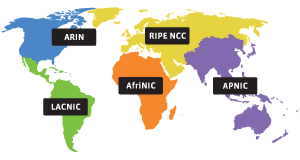
In order to acquire PI addresses you must register them through either an LIR (Local Internet Registry) or by becoming an LIR through a Regional Internet Registry (RIR).
 |
|
It is relatively cheap to acquire AS numbers and PI addresses, which can be acquired through Secura Hosting, which is an LIR.
Once you have your address block, AS number and multiple upstream connections, you announce your address block to each provider, and receive their routing table via an eBGP session. You can then configure quagga a software routing suite to do this.
For more information on BGP see:
BGP Blackmagic: Load Balancing in “The Cloud”
Setting up Quagga
su
apt-get install quagga quagga-doc
touch /etc/quagga/{bgpd.conf,ospfd.conf,zebra.conf}
sed -i 's/bgpd=no/bgpd=yes/' /etc/quagga/daemons
chown quagga.quaggavty /etc/quagga/*.conf

echo 'password YourPassHere' > /etc/quagga/bgpd.conf
echo 'password YourPassHere' > /etc/quagga/ospfd.conf
echo 'password YourPassHere' > /etc/quagga/zebra.conf

sed -i 's/bgpd=no/bgpd=yes/' /etc/quagga/daemons

# By default Linux block traffic that go out from an interface and come back from another.
sed -i 's/.net.ipv4.conf.all.rp_filter=[0,1]/net.ipv4.conf.all.rp_filter=0/;s/.net.ipv4.conf.lo.rp_filter=[0,1]/net.ipv4.conf.lo.rp_filter=0/;s/.net.ipv4.conf.default.rp_filter=[0,1]/net.ipv4.conf.default.rp_filter=0/' /etc/sysctl.conf
sysctl -p

/etc/init.d/quagga start
Configuring Quagga for BGP
andrew-home:~# telnet localhost bgpd
Trying ::1...
Trying 127.0.0.1...
Connected to localhost.
Escape character is '^]'.

Hello, this is Quagga (version 0.99.15).
Copyright 1996-2005 Kunihiro Ishiguro, et al.

User Access Verification

Password:
andrew-home>
andrew-home> enable
andrew-home# conf t
andrew-home(config)# hostname R1
R1(config)# router bgp 65000
R1(config-router)# network 10.1.2.0/24
R1(config-router)# ^Z
R1# wr
Configuration saved to /usr/local/quagga/bgpd.conf
R1# show ip bgp
BGP table version is 0, local router ID is 0.0.0.0
Status codes: s suppressed, d damped, h history, * valid, > best, i - internal,
              r RIB-failure, S Stale, R Removed
Origin codes: i - IGP, e - EGP, ? - incomplete

   Network          Next Hop            Metric LocPrf Weight Path
*> 10.1.2.0/24      0.0.0.0                  0         32768 i

Total number of prefixes 1
R1# exit
Connection closed by foreign host.

# A few addition commands
show ip bgp summary
I wont go too much into configuring this, however there there a few additional resources that can help.
All transit providers for the site accept a prefix advertisement from the multi-homed site, and advertise this prefix globally in the inter-domain routing table. When connectivity between the local site and an individual transit provider is lost, normal operation of the routing protocol will ensure that the routing advertisement corresponding to this particular path will be withdrawn from the routing system, and those remote domain domains who had selected this path as the best available will select another candidate path as the best path. Upon restoration of the path, the path is re-advertised in the inter-domain routing system. Remote domains will undertake a further selection of the best path based on this re-advertised reachability information. Neither the local or the remote host need to have multiple addresses, nor undertake any form of address selection.
Multi-Homing
Problems
This also does have its problems for Provider Independent addresses, which causes concern for this approach to multi-homing via Provider Independent addresses. However Provider Agregable addresses do not typically suffer from the first two points below.
- RIPE warns: “assignment of address space does NOT imply that this address space will be ROUTABLE ON ANY PART OF THE INTERNET”, see PA vs. PI Address Space
- Possible auto summarization on global routing tables. Routing protocols summarize multiple routes into single one to cut down size of the routing tables… So assuming your class is A.B.C.D/26, you may have one or more ISPs having summary route to A.B.0.0/16 pointing to completely different network then your IP is physically in. Understanding Route Aggregation in BGP
- Small subnets such as /24 are heavily penalized by BGP dampening after few flaps.
- “When starting out with BGP, opening sessions with other providers, if you have got tweaking to do and it does start flapping, some providers will simply disconnect you, whilst others will dampen for days. Basically closing any throughput, watching and waiting to see if you stabilize. Others will require require contracts to be drawn up to prove you have competency and proven stability.”, Andrew Gearing
- Many ISPs filter the IP address routing announcements made by their customers to prevent malicious activities such as prefix hijacking. As a result, it can take time for ISPs to reconfigure these filters which are often manually maintained. This can slow down the process of moving IP addresses from the primary datacenter to the backup datacenter.
- Smaller routes won’t be allowed on the global backbone routing BGP tables, because they don’t want a huge table of small allocations – for performance and stability the backbone prefers a small number of relatively large address space chunks.
The above points do not really make this approach feasible for small CIDR blocks, as it will be difficult to justify a large enough range of routes as well as ensuring infrastructure for BGP.
High Availability through EC2
We originally hosted a large number of servers with EC2, however have moved most of our services away from EC2 due to excessive costs with large and extra large instances. At present we have moved a large number to bytemark. The following does put a dependency on a single provider…
Implementation
- EC2 Elastic Load balancing
- Two small EC2 compute nodes in different data centers/region soley for proxying content
- HA Proxy

Benefits:
- Using Elastic Load Balancing, you can distribute incoming traffic across your Amazon EC2 instances in a single Availability Zone or multiple Availability Zones.
- Elastic Load Balancing can detect the health of Amazon EC2 instances. When it detects unhealthy load-balanced Amazon EC2 instances, it no longer routes traffic to those Amazon EC2 instances instead spreading the load across the remaining healthy Amazon EC2 instances.
- Trivial to monitor and spawn instances on failure and re-assign IP addresses
- No need to configure BGP and acquire Provider Independent addresses
- Cost, bandwidth and the elastic load balancer are relatively cheap. ” transferring 100 GB of data over a 30 day period, the monthly charge would amount to $18 (or $0.025 per hour x 24 hours per day x 30 days x 1 Elastic Load Balancer) for the Elastic Load Balancer hours and $0.80 (or $0.008 per GB x 100 GB) for the data transferred through the Elastic Load Balancer, for a total monthly charge of $18.80.”. Small EC2 instances are fairly cheap, and solely forwarding requests.
- EC2 Auto Scaling can be used to spawn more nodes and configure automatically.
Disadvantages:
- “The ELB system strives to scale ahead of demand but wild spikes in traffic demand (such as 0 load to full load swings during initial load testing) can temporarily run past it’s provisioned capacity which will result in 503 Service Unavailable until the system can get ahead of demand. Under extreme overload, timeouts can occur. Customer traffic flows are typically gradual swings that occur at rates measured in minutes or hours, not fractions of a second.”
- This is a problem for load testing, as the ELB will drop connections, however ELB as described will increase capacity gradually, to keep up with demand. Will need to run some load tests to test this, and check whether the service can adequately handle our traffic needs.
- Elastic Load Balancer: An Elasticity Gotcha (Caching DNS and ELB releasing IPs) and Elastic Load Balancer is elastic – how the elasticity is achieved
-
ELB does not immediately release any IP address when traffic decreases. Instead, it removes the IP address from the associated DNS name. However, the IP address continues to be associated with the load balancer for some period of time. During this time, ELB monitors various metrics to check if this IP address is still receiving traffic, and release it when it is appropriate to do so.
-
- Cannot load balance via ELB between regions.
- Health check via ELB minimum is 5 seconds, (Easy to monitor availability between nodes and remove from ELB ).
- Additional latency, however initial tests seem neglible.
# WARNING: changing the keypair associated to an existing key will and running
# ./load.balancing.sh remove will delete all associated instances. Probably best to leave as is.
KEYPAIR=loadbalancing-test;
ELB_NAME='test';
NODES=2;
AMI=ami-b8446fcc;

function remove_elb
{
  #elb-delete-lb $ELB_NAME;
  ec2-describe-instances | grep $KEYPAIR | grep -v terminated | awk '{print $2}' | while read instanceId; do ec2-terminate-instances $instanceId; done;

  ec2-delete-keypair $KEYPAIR && rm ~/.ssh/$KEYPAIR;
}

function create_elb
{
  ec2-add-keypair $KEYPAIR > ~/.ssh/$KEYPAIR;
  chown 0600 ~/.ssh/$KEYPAIR;
  ssh-keygen -p -f ~/.ssh/$KEYPAIR;

  elb-create-lb $ELB_NAME --availability-zones $EC2_AVAILABILITY_ZONE --listener "protocol=http,lb-port=80,instance-port=80"

  # Create instances to attach to ELB
  for i in `seq 1 $NODES`; do
    ec2-run-instances $AMI --user-data-file install-lamp -k $KEYPAIR
  done;

  # Authorize CIDR Block 0.0.0.0/0
  ec2-authorize default -p 22
  ec2-authorize default -p 80

  addresses_allocated=0;
  ec2-describe-instances | grep $KEYPAIR | grep -v terminated | awk '{print $2}' | while read instanceId; do
    echo elb-register-instances-with-lb $ELB_NAME --instances $instanceId;
    elb-register-instances-with-lb $ELB_NAME --instances $instanceId;

#    # Allocate addresses for each node
#    # You may need to contact EC2 to increase the amount of IP addresses you can allocate, however these will be hidden, so not important
#    while [ "`ec2-describe-addresses | grep -v 'i-' | awk '{print $2}' | wc -l`" -lt "$NODES" ]; do
#      ec2-allocate-address;
#    fi;
#
#    # Allocate non associated addresses
#    ec2-describe-addresses | grep -v 'i-' | awk '{print $2}' | while read ip_address; do
#      echo $ip_address;
#      ec2-associate-address $ip_address -i $instanceId
#      addresses_allocated=$(($addresses_allocated+1));
#    done;

  done;

  elb-configure-healthcheck $ELB_NAME  --headers --target "TCP:80" --interval 5 --timeout 2 --unhealthy-threshold 2 --healthy-threshold 2
  elb-enable-zones-for-lb $ELB_NAME --availability-zones $EC2_AVAILABILITY_ZONE

}

function test_elb
{
  SERVER="`ec2-describe-instances | grep $KEYPAIR | grep -v terminated | head -n1 | awk '{print $4}'`"
  instanceId="`ec2-describe-instances | grep $KEYPAIR | grep -v terminated | head -n1 | awk '{print $2}'`"
  echo "Shutting down $SERVER";
  ssh -i ~/.ssh/$KEYPAIR root@$SERVER "/etc/init.d/apache2 stop"

  sleep 11;
  elb-describe-instance-health $ELB_NAME

  ssh -i ~/.ssh/$KEYPAIR root@$SERVER '/etc/init.d/apache2 start'
  sleep 2;
  elb-describe-instance-health $ELB_NAME
}

if ( [ $# -gt 0 ] && ( [ $1 = "create" ] || [ $1 = "remove" ] || [ $1 = "test" ] || [ $1 = "health" ] ) ); then
  command="$1;"
else
  echo "Usage `basename $0` create|remove";
  echo "Usage `basename $0` test";
  exit;
fi;

case $1 in
  "remove")
    remove_elb;
  ;;
  "create")
      create_elb;
  ;;
  "test")
      test_elb;
  ;;
  "health")
        elb-describe-instance-health $ELB_NAME;
  ;;
esac;
Node configuration:
Change the ip addresses 192.0.32.10:80 to the relevant servers, presently this points to example.com.
install-lamp
#!/bin/bash

export DEBIAN_FRONTEND=noninteractive;
apt-get update && apt-get upgrade -y && apt-get install -y apache2 haproxy subversion;
tasksel install lamp-server;
echo "Please remember to set the MySQL root password!";
IP_ADDRESS="`ifconfig  | grep 'inet addr:'| grep -v '127.0.0.1' | cut -d: -f2 | awk '{ print $1}'`";
echo $IP_ADDRESS >/var/www/index.html;

cat > /etc/haproxy/haproxy.cfg < < EOF
global
	log /dev/log    local1
	maxconn 4096
	#chroot /usr/share/haproxy
	user haproxy
	group haproxy
	daemon
	#debug
	#quiet
defaults
	log     global
	mode    http
	option  httplog
	option  dontlognull
	retries 3
	option redispatch
	maxconn 2000
	contimeout      5000
	clitimeout      50000
	srvtimeout      50000
	option      httpclose

listen gkweb $IP_ADDRESS:80
	mode http
	balance leastconn
	stats enable
	stats realm LB Statistics
	stats auth stats:password
	stats scope .
	stats uri /stats?stats
	#persist
	server web1 192.0.32.10:80 check inter 2000 fall 3
	server web2 192.0.32.10:80 check inter 2000 fall 3
	server web3 192.0.32.10:80 check inter 2000 fall 3
	server web4 192.0.32.10:80 check inter 2000 fall 3
EOF

sed -i -e 's/^ENABLED.*$/ENABLED=1/' /etc/default/haproxy;
/etc/init.d/apache2 stop;
/etc/init.d/haproxy restart;
Commercial:
References:
Multihoming to one ISP
Multipath Load Sharing with two ISPs
Small site multihoming
EBGP load balancing with EBGP session between loopback interfaces
Failover and Global Server Load Balancing for Better Network Availability
The “Elastic” in “Elastic Load Balancing”: ELB Elasticity and How to Test it
EC2 Instance Belonging to Multiple ELBs, (Creating different tiers of service, Splitting traffic across multiple destination ports)
- (1) Comment
- Tags: EC2, HA, High Availability
EC2 Tools Installation: AMI, API, Elastic Load Balancing (ELB), Auto Scaling and Cloud Watch
In: General
16 Jan 2010Updated bash script 23/01/2010: The script was assumed to run from EC2 itself, however I have since modified this so its applicable to local environments and made a little more robust.
There are quite a number of new tools from EC2, each requiring some form of setup on the server. As a result I have created a bash script to install them automatically.
- AMI Tools
- API Tools
- Elastic Load Balancing Tools
- Cloud Watch Tools
The only prerequisite is to install the certificate and private key within ~/.ec2/pk.pem and ~/.ec2/cert.pem and Java if on Fedora.
I have tested this on Debian and Fedora, which uses either yum or apt to execute the install of some dependencies, although it does assume that you are running under root.
You can download it from here ec2.sh
#!/bin/bash

DEBUG=1;

if [ "$(id -u)" != "0" ]; then
  echo "This script must be run as root" 1>&2
  exit 1
fi

GREP="`which grep`";
if which apt-get >/dev/null; then
  PACKAGE_MANAGEMENT="`which apt-get` "
else
  PACKAGE_MANAGEMENT="`which yum`"
fi

if which dpkg >/dev/null; then
  PACKAGE_TEST="dpkg --get-selections | $GREP -q "
else
  PACKAGE_TEST="rpm -qa | $GREP -q "
fi

CURL_OPTS=" --silent --retry 1 --retry-delay 1 --retry-max-time 1 "

function log
{
  if [ "$DEBUG" -eq 1 ]; then
    echo $1;
  fi;
}

function bail
{
  echo -e $1;
  exit 1;
}

function check_env
{
  if [ -f ~/.bashrc ]; then
    . ~/.bashrc;
  fi

  # Tools already exist
  if [ -z `which ec2-describe-instances` ] || [ -z `which ec2-upload-bundle` ] || [ -z `which ec2-describe-instances` ] || [ -z `which elb-create-lb` ] || [ -z `which mon-get-stats` ] || [ -z `which as-create-auto-scaling-group` ]; then
    log "Amazon EC2 toolkit missing!"
    install_ec2;
  fi

  # EC2_HOME set
  if [ -z "$EC2_HOME" ]; then
    log "Amazon EC2 is not set-up correctly! EC2_HOME not set"
    if ! grep EC2_HOME ~/.bashrc; then
      echo "export EC2_HOME=/usr/local/ec2-api-tools/" >> ~/.bashrc
    fi;
    export EC2_HOME=/usr/local/ec2-api-tools/
    source ~/.bashrc
  fi

  # Java
  if [ -z "$JAVA_HOME" ]; then

    if grep -i yum "$PACKAGE_MANAGEMENT" > /dev/null; then
      bail "nPlease install java manually (do not use yum install java, it is incompatible)nsee JRE http://java.sun.com/javase/downloads/index.jspnDownload, run the bin file, place in /opt/ and update ~/.bashrc. Once complete run 'source ~/.bashrc;'";
    fi;

    $PACKAGE_MANAGEMENT install -y sun-java6-jdk
    JAVA_PATH=/usr/lib/jvm/java-6-sun/jre/;

    echo "export JAVA_HOME=$JAVA_PATH" >> ~/.bashrc
    export JAVA_HOME=$JAVA_PATH
    source ~/.bashrc
  fi

  # Keys
  EC2_HOME_DIR='.ec2';
  EC2_PRIVATE_KEY_FILE="$HOME/$EC2_HOME_DIR/pk.pem";
  EC2_CERT_FILE="$HOME/$EC2_HOME_DIR/cert.pem";

  if [ ! -d "$HOME/$EC2_HOME_DIR" ]; then
    mkdir -pv "$HOME/$EC2_HOME_DIR";
  fi

  install_ec2_env EC2_PRIVATE_KEY "$EC2_PRIVATE_KEY_FILE";
  install_ec2_env EC2_CERT        "$EC2_CERT_FILE";

  install_ec2_keys_files "$EC2_PRIVATE_KEY_FILE" "Private key";
  install_ec2_keys_files "$EC2_CERT_FILE" "Certificate";

  install_ec2_env AWS_AUTO_SCALING_HOME "/usr/local/ec2-as-tools/"
  install_ec2_env AWS_ELB_HOME          "/usr/local/ec2-elb-tools/"
  install_ec2_env AWS_CLOUDWATCH_HOME   "/usr/local/ec2-cw-tools/"

  get_region
  get_availability_zone

}

function install_ec2_env
{
  # Variable Variable for $1
  EC2_VARIABLE=${!1};
  EC2_VARIABLE_NAME=$1;
  EC2_FILE=$2;

  #log "VARIABLE: $EC2_VARIABLE_NAME=$EC2_VARIABLE";

  # Variable Variable
  if [ -z "$EC2_VARIABLE" ]; then
    log "Amazon $EC2_VARIABLE_NAME is not set-up correctly!";

    if ! grep -q "$EC2_VARIABLE_NAME" ~/.bashrc > /dev/null; then
      echo "export $EC2_VARIABLE_NAME=$EC2_FILE" >> ~/.bashrc;
    fi;
    export $EC2_VARIABLE_NAME=$EC2_FILE;
    source ~/.bashrc
  else
    if ! grep -q "$EC2_VARIABLE_NAME" ~/.bashrc > /dev/null; then
      echo "export $EC2_VARIABLE_NAME=$EC2_FILE" >> ~/.bashrc;
    else
      log "Amazon $EC2_VARIABLE_NAME var installed";
    fi;
  fi
}

function install_ec2_keys_files
{
  EC2_FILE=$1;
  EC2_DESCRIPTION=$2;
  EC2_CONTENTS='';

  if [ ! -f "$EC2_FILE" ]; then
    bail "Amazon $EC2_FILE does not exist, please copy your $EC2_DESCRIPTION to $EC2_FILE and re-run this script";
  else
    log "Amazon $EC2_FILE file installed";
  fi
}

function install_ec2
{

  for PACKAGE in curl wget tar bzip2 unzip zip symlinks unzip ruby; do
    if ! which "$PACKAGE" >/dev/null; then
      $PACKAGE_MANAGEMENT install -y $PACKAGE;
    fi
  done;

  # AMI Tools
  if [ -z "`which ec2-upload-bundle`" ]; then
    curl -o /tmp/ec2-ami-tools.zip $CURL_OPTS --max-time 30 http://s3.amazonaws.com/ec2-downloads/ec2-ami-tools.zip
    rm -rf /usr/local/ec2-ami-tools;
    cd /usr/local && unzip /tmp/ec2-ami-tools.zip
    ln -svf `find . -type d -name ec2-ami-tools*` ec2-ami-tools
    chmod -R go-rwsx ec2* && rm -rvf /tmp/ec2*
  fi

  # API Tools
  if [ -z "`which ec2-describe-instances`" ]; then
    log "Amazon EC2 API toolkit is not installed!"
    curl -o /tmp/ec2-api-tools.zip $CURL_OPTS --max-time 30 http://s3.amazonaws.com/ec2-downloads/ec2-api-tools.zip
    rm -rf /usr/local/ec2-api-tools;
    cd /usr/local && unzip /tmp/ec2-api-tools.zip
    ln -svf `find . -type d -name ec2-api-tools*` ec2-api-tools
    chmod -R go-rwsx ec2* && rm -rvf /tmp/ec2*
  fi

  # ELB Tools
  if [ -z "`which elb-create-lb`" ]; then
    curl -o /tmp/ec2-elb-tools.zip $CURL_OPTS --max-time 30 http://ec2-downloads.s3.amazonaws.com/ElasticLoadBalancing-2009-05-15.zip
    rm -rf /usr/local/ec2-elb-tools;
    cd /usr/local && unzip /tmp/ec2-elb-tools.zip
    mv ElasticLoadBalancing-1.0.3.4 ec2-elb-tools-1.0.3.4;
    ln -svf `find . -type d -name ec2-elb-tools*` ec2-elb-tools
    chmod -R go-rwsx ec2* && rm -rvf /tmp/ec2*
  fi

  # Cloud Watch Tools
  if [ -z "`which mon-get-stats`" ]; then
    curl -o /tmp/ec2-cw-tools.zip $CURL_OPTS --max-time 30 http://ec2-downloads.s3.amazonaws.com/CloudWatch-2009-05-15.zip
    rm -rf /usr/local/ec2-cw-tools;
    mv -v CloudWatch-1.0.2.3 ec2-cw-tools-1.0.2.3
    cd /usr/local && unzip /tmp/ec2-cw-tools.zip
    ln -svf `find . -type d -name ec2-cw-tools*` ec2-cw-tools
    chmod -R go-rwsx ec2* && rm -rvf /tmp/ec2*
  fi

  if [ -z "`which as-create-auto-scaling-group`" ]; then
    curl -o /tmp/ec2-as-tools.zip $CURL_OPTS --max-time 30 http://ec2-downloads.s3.amazonaws.com/AutoScaling-2009-05-15.zip
    rm -rf /usr/local/ec2-as-tools;
    mv -v AutoScaling-1.0.9.0 ec2-as-tools-1.0.9.0
    cd /usr/local && unzip /tmp/ec2-as-tools.zip
    ln -svf `find . -type d -name ec2-as-tools*` ec2-as-tools
    chmod -R go-rwsx ec2* && rm -rvf /tmp/ec2*
  fi

  ln -sf /usr/local/ec2-api-tools/bin/* /usr/bin/;
  ln -sf /usr/local/ec2-ami-tools/bin/* /usr/bin/;
  ln -sf /usr/local/ec2-elb-tools/bin/* /usr/bin/;
  ln -sf /usr/local/ec2-cw-tools/bin/* /usr/bin/;
  ln -sf /usr/local/ec2-as-tools/bin/* /usr/bin/;

  rm -f /usr/bin/ec2-*.cmd;

}

function get_availability_zone
{
  # Not reliable between availability zones using meta-data
  # export EC2_AVAILABILITY_ZONE="`curl $CURL_OPTS --max-time 2 http://169.254.169.254/2009-04-04/meta-data/placement/availability-zone`"

  get_instance_id;

  if [ ! -z "$EC2_INSTANCE_ID" ]; then
    EC2_AVAILABILITY_ZONE="`ec2-describe-instances | grep -q $EC2_INSTANCE_ID | awk '{print $11}'`"
    if [ -z "$EC2_AVAILABILITY_ZONE" ] && [ ! "$EC2_AVAILABILITY_ZONE"="" ]; then
      export EC2_AVAILABILITY_ZONE=$EC2_AVAILABILITY_ZONE;
      install_ec2_env EC2_AVAILABILITY_ZONE $EC2_AVAILABILITY_ZONE;
    fi;
  fi;
}

function get_region
{
  get_instance_id;
  if [ ! -z "$EC2_INSTANCE_ID" ]; then
    EC2_REGION="`ec2-describe-instances | grep $EC2_INSTANCE_ID | awk '{print $11}'`"
    if [ -z "$EC2_REGION" ]; then
      export EC2_REGION=$EC2_REGION;
      install_ec2_env EC2_REGION $EC2_REGION;
      install_ec2_env EC2_URL "https://ec2.$EC2_REGION.amazonaws.com" | sed 's/a.amazonaws.com/.amazonaws.com/'
    fi;
  fi;
}

function get_instance_id
{
  instanceId="`curl $CURL_OPTS --max-time 2 http://169.254.169.254/1.0/meta-data/instance-id`"
  if [ ! -z "$instanceId" ]; then
    export EC2_INSTANCE_ID="$instanceId";
  fi;
}

check_env
About this blog
I have been a developer for roughly 10 years and have worked with an extensive range of technologies. Whilst working for relatively small companies, I have worked with all aspects of the development life cycle, which has given me a broad and in-depth experience.
Archives
- September 2020
- December 2015
- June 2015
- May 2015
- October 2014
- April 2013
- October 2012
- September 2012
- July 2012
- January 2012
- December 2011
- June 2011
- February 2011
- January 2011
- December 2010
- July 2010
- May 2010
- April 2010
- January 2010
- December 2009
- October 2009
- June 2009
- February 2008
- July 2007
- June 2007
- April 2007
- December 2006
- October 2006
- August 2006
- July 2006
- April 2006
- March 2006
- February 2006
- January 2006
- December 2005
- November 2005
- October 2005
- August 2005
- July 2005
- June 2005
- March 2005
- June 2004
- Ozzy: Thanks Andy. This was useful (: [...]
- shahzaib: Nice post . I have a question regarding BGP. As you said, we'll need to advertise our route from mul [...]
- Steve: Hi there… sorry that this is old, but I’m trying to use your script to check for my u [...]
- John Cannon: Hey that was really needful. Thanks for sharing. I’ll surely be looking for more. [...]
- andrew.johnstone: In the example above this was in fact using spl_autoload_register. I’ve never debugged this proper [...]
- Istio EnvoyFilter to add x-request-id to all responses
- Amazon ELB – monitoring packet count and byte size with Amazon Cloudwatch and VPC flow logs
- SSL – Amazon ELB Certificates
- Automatically update Amazon ELB SSL Negotiation Policies
- Amazon Opsworks – Dependent on Monit
- Awk craziness: Processing log files
- Elastic Search Presentation
- Requests per second from Apache logs
- Hackday @ Everlution
- apt-get unattended / non-interactive installation